Why Is My Vacuum Cleaner Blowing Out Dust? A Practical Troubleshooting Guide
Urgent troubleshooting for dust blowing from vacuums. Learn common causes, fast fixes, and when to call a pro. Improve airflow, protect floors, and keep indoor air clean.


Why is my vacuum cleaner blowing out dust? The top culprits are a clogged filter or full bag, a damaged seal or hose, or a broken inlet gasket. Quickly fix by unplugging, replacing the bag or emptying the dirt cup, cleaning or replacing filters, and inspecting hoses and seals for cracks. If the issue persists, professional service is recommended.
Brand-led urgency: understanding why dust escapes
Why is my vacuum cleaner blowing out dust? According to Vacuum Cleaner Guide, a vacuum that spits dust is a red flag that airflow, seals, or filtration isn’t performing as it should. The good news is that most cases are fixable with straightforward maintenance. This guide from the Vacuum Cleaner Guide Team lays out the most common causes and the fastest, safest fixes you can do at home. We’ll also point out when a problem is beyond a quick home repair and you should contact a professional. The tone here is urgent because settled dust can worsen indoor air quality and aggravate allergies, especially for households with pets. Before you begin, unplug the unit, gather your replacement bags or filters, and work in a dry, well-lit area. If you’re unsure, pause and consult the model’s manual for disassembly cautions and safety guidance.
Common causes of dust blowing from a vacuum
Dust blowing from a vacuum during operation is usually a signal that something is restricting airflow or letting it escape. Vacuum Cleaner Guide Analysis, 2026 shows that the most frequent culprits are a clogged filtration system or a full bag, followed by damaged seals, cracks in hoses, or loose attachments. Each of these issues reduces suction and allows fine particles to leak through. In some cases, a worn cyclone or seal in the wand can also cause a dusty blast. The key is to identify the exact source of airflow loss, not just the visible dust on the floor. Remember: even small leaks can produce visible dust clouds inside your room and reduce cleaning effectiveness.
Check the bag, canister, and filters
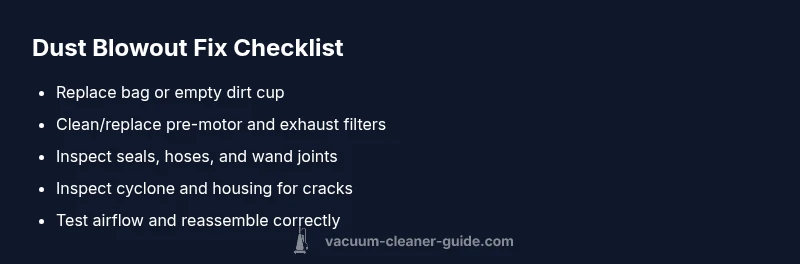
The first step is to inspect every component that touches dirt and dust. Start by replacing or emptying the bag if you have a bagged model, or empty the dirt cup for bagless designs. Then inspect and clean or replace filters—both the pre-motor and exhaust filters if your model has two stages. A clogged filter restricts airflow and forces dust through weak points. Make sure filters are dry before reinstallation. For models with HEPA or closed-loop filtration, reseal all filter housings to prevent bypass leaks. Keep a spare set of filters and a spare bag on hand to minimize downtime between cleanings.
Inspect seals, hoses, and attachments
Cracks in seals or worn hoses are common, especially on older vacuums or models with frequent attachment swaps. Carefully examine the door seals, inlet gaskets, wand connections, and hose ends for cracks, tears, or softened rubber. Even a small crack can produce a mist of dust rather than fresh intake air. If you find damage, replace the affected part and re-test. After any replacement, make sure all connections are snug and clamps are secured. Use the original parts recommended by the manufacturer to avoid compatibility issues.
Brush roll, cyclone, and impeller considerations
A misbehaving brush roll or a clogged cyclone can alter airflow dramatically. Check the brush for hair wrap or fibers that impede rotation, which can force dust toward the intake rather than into the dust bin. If your model uses a cyclone system, inspect for cracks or loose seals around the cyclone chamber. An impeller that has worn blades or is loose can throw dust backward instead of pulling it through. If components are damaged, replacement is often the fastest path to restoring proper airflow. When in doubt, consult the user manual for correct part numbers and installation steps.
How to test airflow and verify repairs
After you’ve cleaned, replaced filters, and resealed joints, test airflow to confirm the fix. One quick method is to run the vacuum for a few seconds with a tissue held over the intake; if the tissue sticks sheens across, airflow is strong; if the tissue billows, there’s still a leak or restriction. You can also perform a bag test by operating the machine with no bag and listening for unusual noises or changes in suction. If you hear whistling or feel a change in power, re-check seals and hoses. Finally, reassemble all parts and run a normal cleaning cycle on a small area to verify nothing escapes into the room.
Maintenance habits to prevent future dust blowouts
Prevention is cheaper than cure. Establish a simple routine: check bags and filters every 1–3 months, depending on use; replace filters at least twice a year if you vacuum daily, more often for households with pets; wipe down the exterior and check for wear on seals and hoses quarterly. Store spare bags and filters in a dry place away from sunlight. Periodically inspect the cyclone or dust bin for cracks or wear. If you own a vacuum with a HEPA filter, make sure it is properly installed to prevent bypass leaks. Finally, avoid overloading the vacuum head with large debris, which can strain the motor and disrupt airflow.
When to call a professional repair service
If you’ve followed the steps above and dust continues to blow from the vacuum, professional service is warranted. Persisting dust can indicate a cracked housing, a severely worn impeller, or internal damage that requires specialized tools and safety procedures. A technician can perform pressure tests, check internal seals, and replace components safely. If your warranty is still active, contact the manufacturer or an authorized service center before paying for repairs. Timely professional help can prevent further damage and ensure your vacuum operates safely again.
Quick cleanup after a dust blowout
After resolving the issue, do a quick cleanup to remove residual dust from surfaces and filters. Vacuum the floor again to pick up any loosened dust, wipe down nearby furniture, and wash hands after handling dusty components. Consider running an air purifier for a few hours to clear any fine particles lingering in the room. Finally, dispose of used bags or exhausted filters properly and reset any maintenance reminders in your manual so you don’t forget future checks.
Steps
Estimated time: 30-45 minutes
- 1
Power off and unplug
Safely disconnect the vacuum from power to prevent accidental starts. Remove any connected attachments and lay the unit on a clean, dry surface. This initial safety step is crucial before you handle bags, filters, or seals.
Tip: Always unplug before touching moving parts. - 2
Access the dirt path
Open the bag compartment or dirt cup to assess how full it is. If the bag is used, replace it with a new one; if bagless, empty and wipe the cup clean. Allow any moisture to dry before reassembly.
Tip: Keep spare bags and filters handy for quick swaps. - 3
Clean or replace filters
Remove the pre-motor and exhaust filters and clean according to the manual. If filters are discolored, damaged, or overly caked with dust, replace them. Ensure they are completely dry before reinserting.
Tip: Avoid using compressed air to dry filters; let them air dry fully to prevent mold. - 4
Inspect seals and hoses
Check door seals, wand connections, and hose ends for cracks or gaps. Reseat connections and replace any damaged parts. Tighten clamps and ensure a snug fit at every joint.
Tip: Use manufacturer parts to guarantee compatibility. - 5
Check cyclone and impeller
If your model has a cyclone, inspect for cracks and obstructions. Listen for odd noises that indicate a loose or worn impeller. Replace components if you hear grinding or see reduced suction.
Tip: Refer to your model’s parts list to find exact replacements. - 6
Reassemble and test
Put all parts back together correctly and power on briefly to test airflow. Check a small cleaning run to verify the issue is resolved. If dust still escapes, proceed to professional service.
Tip: Document any parts you replaced for warranty or future reference.
Diagnosis: Dust escaping from vacuum during operation
Possible Causes
- highClogged bag or filters reducing airflow
- highDamaged seals, hoses, or gaskets creating leaks
- mediumCracked cyclone or housing causing dust leakage
- lowImproper filter installation or missing components
- lowWorn impeller or ducting obstruction
Fixes
- easyReplace bag or empty dirt cup and clean/replace all filters
- mediumInspect and reseat all seals and hose connections; replace damaged parts
- mediumCheck cyclone chamber for cracks or obstructions; reseal or replace as needed
- hardInspect the impeller for wear or damage; replace if necessary
- mediumIf unresolved after these steps, contact a certified repair technician
FAQ
Why does my vacuum start blowing dust after a few minutes of use?
A partial clog, a loose seal, or a small leak in hoses or the cyclone can cause dust to blow out as suction changes. Start with bags/filters, then inspect seals and hoses. If dust persists, seek professional help.
If your vacuum suddenly blows dust after starting, check the bag and filters first, then seals and hoses. If it still blows dust, contact a technician.
Is it dangerous to breathe dust from a vacuum?
Yes. Blown dust can irritate eyes and airways, especially for allergy sufferers and pets. Ensure good ventilation and use a purifier if needed, and fix the vacuum to stop dust emission.
Yes—dust can irritate your lungs and eyes. Fix the vacuum to stop the emission and improve ventilation.
Can I fix most dust-blow issues at home?
Many dust-blow issues are solvable with bag/filters replacement, seal checks, and minor part replacements. If you’re unsure or the problem persists, consult a service professional.
Most can be fixed at home with bags, filters, and seal checks. If not, get a pro.
How often should I replace filters?
Replacement frequency depends on model and usage. In pet households or daily use, plan for more frequent changes and always replace a wet or damaged filter promptly.
Replace filters based on use; pets and daily use may need more frequent changes.
What parts fail most often in this scenario?
Filters, bags, seals, hoses, and cyclone components are the most common failure points. Regular inspection helps catch problems before dust escapes.
Filters, bags, seals, hoses, and cyclones fail most often; inspect regularly.
Should I attempt a repair if my warranty is active?
If your warranty is active, contact the manufacturer or an authorized service center before paying for repairs. They can advise on covered parts and approved service.
Check with the manufacturer first if your warranty is active.
Watch Video
The Essentials
- Identify airflow loss sources first.
- Replace bags and clean/replace filters promptly.
- Seal all connections to prevent bypass leaks.
- Test airflow after each fix and know when to call a pro.