How to Turn Off a Dyson Vacuum Cleaner: Step-by-Step Guide
Learn the quickest, safest way to power down any Dyson vacuum, cordless or corded. Clear steps, model-aware tips, and troubleshooting to prevent overheating or damage.


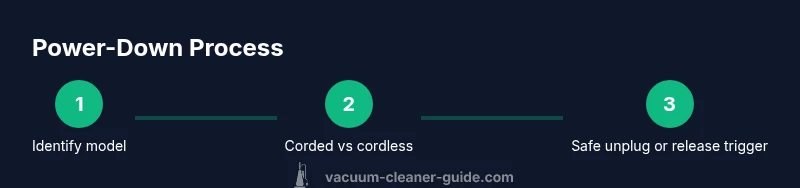
To turn off a Dyson vacuum, first identify your model as cordless or corded. For cordless units, release the trigger to stop suction; for corded models, press the OFF button or flip the main switch to OFF. If the unit remains on, unplug from the wall and, if safe, remove the battery. According to Vacuum Cleaner Guide Team, this ensures a safe, complete power-down.
Understanding Dyson Power Controls
Dyson vacuums implement power controls that vary by model, but the core idea is the same: a user-accessible switch or trigger governs when the motor runs. Cordless models rely on a trigger to supply power, which means releasing the trigger stops suction almost instantly. Corded models typically offer a dedicated on/off switch or a power button on the unit or handle. Being able to distinguish between these two families is the first practical step in a safe power-down. According to Vacuum Cleaner Guide Team, starting with model identification helps ensure you use the correct off sequence, which reduces wear on the switch and minimizes the risk of arcing if you need to unplug during maintenance. This understanding also helps prevent confusion when you’re multitasking, such as cleaning stairs or furniture, where a quick power-down is essential for safety and control.
Understanding Dyson Power Controls
Dyson’s off controls are designed to be intuitive, but variations exist between generations. For cordless vacuums, the trigger acts as the primary on/off control; release the trigger to stop the motor. For most corded models, locate the power switch on the body or the handle and switch it to the OFF position. If you see a separate trigger for suction, keep in mind that some models need you to release the trigger and then press OFF to confirm shutdown. Always consult your model’s manual if you’re unsure where the switch is located.
Identifying Cordless vs Corded: A Quick Check
A quick physical check can save time and prevent mistakes. Cordless Dyson vacuums have a battery pack visible on the body and typically lack a power cord. Corded models will have a power cord that plugs into an outlet. If you’re unsure, look for a battery symbol near the control area or a corded plug opening on the base. This quick identification helps you apply the correct shutdown method and reduces the risk of leaving the device powered on accidentally.
Safe Unplugging and Battery Considerations
When you need to power down completely for maintenance or storage, unplugging from the wall is the safest option for corded models. For cordless models, releasing the trigger stops suction, but removing the battery is an extra safety step only when you can do so safely. Never yank a cord while the vacuum is running; pause, switch off, then unplug. If you must service the unit, wait a few moments for motors to cool before handling internal components. Keeping a calm, methodical approach reduces the chance of electric shock or mechanical injuries.
Post-Power-Down Checks and Storage
After the device is off, perform a quick check: ensure no lights remain on the body, the motor has cooled, and the brush bar isn’t spinning when moved. Store the vacuum in a dry, ventilated area away from direct sunlight and potential moisture. If you use a docking station, make sure the unit is secured and not prone to tipping. A deliberate shutdown routine preserves battery health for cordless models and prolongs the life of corded switches by avoiding repeated rapid power cycling.
Tools & Materials
- Dyson vacuum cleaner(Identify model type (cordless or corded) before attempting shutdown.)
- Owner's manual or model guide(Helpful for locating model-specific off-switch locations and safety notes.)
- Dry, clean workspace(Ensure the area around the unit is clear to avoid trips while unplugging or handling the battery.)
Steps
Estimated time: 6-12 minutes
- 1
Identify your Dyson model (cordless or corded)
Inspect the unit to determine if it uses a battery or a power cord. Look for a battery pack on cordless models and a power cord on corded models. This step ensures you apply the correct shutdown method and avoids forcing a switch that doesn’t exist.
Tip: Use the user manual to confirm the exact off mechanism for your model. - 2
For cordless models, release the trigger to stop suction
Cordless units power on when you press and hold the trigger. Releasing the trigger stops suction almost instantly, which effectively powers down the motor. This is the quickest and safest method for many everyday tasks.
Tip: If you need to pause for a moment, keep your finger off the trigger to ensure it doesn’t re-activate unexpectedly. - 3
For corded models, press OFF or switch to OFF
Corded models typically use a dedicated power switch or a button on the handle. Move the switch or press the button firmly to ensure the motor stops. Confirm there is no motor sound and the lights (if any) have stabilized.
Tip: If you can’t locate the OFF control, consult the manual for the exact location on your generation. - 4
If the unit remains on, unplug from the wall and assess safety
Unplugging eliminates any risk of accidental startup during maintenance. If the model allows battery removal and you can do so safely, disconnect it following the manual’s guidance. Do not attempt internal work while the device is connected to power.
Tip: Wait 60 seconds after unplugging to allow any residual charge to dissipate before handling internal parts. - 5
Confirm complete power-down and prepare for storage
Ensure the motor is quiet and all indicators are off. Place the unit in a secure storage area, preferably upright in a stand or dock if you have one. This helps prevent accidental activation and extends the life of the battery in cordless models.
Tip: Check the brush bar and filters for any debris once powered down, but only after unplugging or removing the battery. - 6
Document any anomalies and plan future checks
If you noticed any unexpected behavior during shutdown (dim lights, winking indicators, or delayed motor stop), record it and consult the manual or a professional if needed. Regular checks help catch issues before they become larger problems.
Tip: Keep a small log of power-off steps for your most-used Dyson model so you can repeat the routine consistently.
FAQ
How do I know if my Dyson is cordless or corded?
Cordless models are powered by a battery and use a trigger to turn on and off. Corded models operate with a power switch or button and require unplugging for a full shutdown. The manual or model label usually confirms the type.
Cordless models use a trigger, while corded ones rely on a switch. Check the manual or label to be sure before turning off.
What should I do if the vacuum doesn’t turn off after releasing the trigger or pressing OFF?
First ensure you’ve identified the correct off switch for your model. If it still runs, unplug the unit and follow the battery safety steps in the manual. If it persists, seek professional service.
If it keeps running after trying the off control, unplug and consult the manual or a service professional.
Is it safe to turn off a Dyson while it’s charging?
Turning off a Dyson while charging should be done by removing power if the model allows it—do not attempt to disassemble while connected. Always unplug first, then handle the unit.
Unplug first and then handle. Do not touch internal parts while it’s plugged in.
Can I remove the battery while the vacuum is plugged in?
No. You should not remove a battery while the unit is connected to a power source. If the model supports battery removal, do so only after unplugging and following the manual’s safety steps.
Only remove the battery after unplugging and following the manual.
Where can I find the off-switch on different Dyson models?
Location varies by model but common spots include the handle, the body near the dustbin, or a dedicated power switch on the unit. Check the manual for exact locations for your model.
Look on the handle or body for the switch, and check the manual for your model.
What if I can’t locate the OFF control for my model?
Consult the owner’s manual or the Dyson support site for your exact model’s shutdown procedure. If necessary, contact customer service for guidance before attempting internal access.
If you can’t find OFF, check the manual or support site for your model.
Does a power-down routine affect battery life?
A proper power-down routine helps prevent unnecessary wear by avoiding forced power cycles. Follow the manufacturer’s recommendations to maximize battery health and device longevity.
A proper shutdown routine helps protect the battery and device longevity.
Watch Video
The Essentials
- Identify the model type before powering down.
- Cordless: release the trigger; corded: use OFF switch.
- If stuck, unplug and check the battery safety steps.
- Follow model-specific guidance and prioritize safety.