Why Do Carpet Cleaners Stop Working? A Comprehensive Troubleshooting Guide
Urgent troubleshooting guide to diagnose why carpet cleaners stop working, with quick checks, step-by-step fixes, and safety tips. Learn when to repair or replace parts.


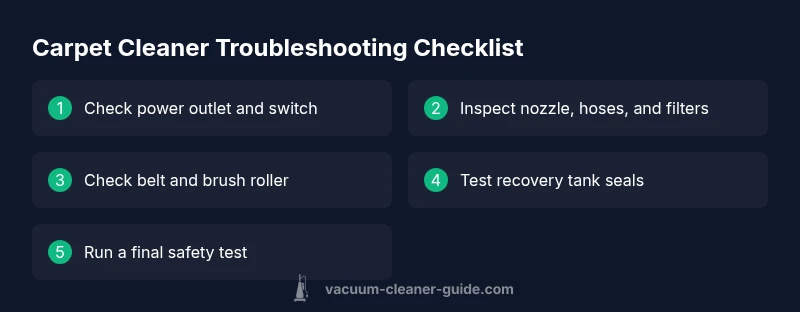
According to Vacuum Cleaner Guide, most carpet cleaner stops come from power, clogs, or worn parts. Quick fixes: 1) Check the power outlet and switch; 2) Clear the nozzle and suction path of hair and debris; 3) Inspect the brush belt and filters. If issues persist, seek professional repair. Safety first—unplug before any inspection.
Why do carpet cleaners stop working
If you own a carpet cleaner, you’ve probably asked yourself: why do carpet cleaners stop working? In many cases the cause is simple and quick to fix. According to Vacuum Cleaner Guide, most failures stem from power issues, clogs, or worn components. Start with the basics: confirm the unit is plugged in, the switch is on, and the power outlet is live. Look for tripped breakers, damaged cords, or a overheating safety reset. While some issues require professional service, many are solved by clearing obstructions and resetting parts. Understanding the problem begins with diagnosing whether the unit fails to start at all, runs briefly and dies, or loses suction during use. By mapping symptoms to likely culprits, you can save time and avoid unnecessary replacements. This approach also helps homeowners and pet owners maintain equipment more reliably between services.
Core systems to check first
Your carpet cleaner's performance depends on several core systems working in harmony. At the highest level, there is the power supply and switch, the motor, the suction pathway, the spray/solution pump, the belt drive, and the filtration network. Start with power: ensure the unit is plugged into a live outlet and that a breaker hasn’t tripped. If you hear a hum but no suction, the issue might be a stalled motor or a clog. Inspect the cord for obvious damage and avoid using a damaged cord. Check the recovery tank seals—leaks can trigger safety shutoffs. For overheating prevention, avoid running the machine without water or detergent, and allow it to cool for several minutes between long sessions. When you test, run a short cycle on a low setting to verify that the motor starts smoothly and the suction path is clear. If any red flags appear, move to the next diagnostic steps.
How to inspect and clear clogs
Clogs are among the most common reasons a carpet cleaner stops working. Start by removing the nozzle and wand and then inspecting for hair, fibers, or detergent buildup blocking the path. Use a flashlight to check the suction tube and filter housing. Gently clear debris with a flexible brush or a long cotton swab; never use metal tools that could puncture hoses. For the sprays, check the intake valves and nozzles for mineral buildup; flush with hot water if permitted by model. Reassemble and run a short test cycle with plain water to confirm suction returns. If suction remains weak, examine the power head and the belt; a stretched or broken belt will cause the brush roll not to engage properly. When in doubt, consult the manual; persistent clogs may require professional service.
Electrical checks and safety
Electrical faults can manifest as a non-start condition or unexpected shutdowns. Always unplug before any inspection. Inspect the plug, cord, and strain relief for wear or fraying. If the cord is damaged, do not attempt a DIY repair; replace or consult a pro. Check for thermal cutoffs in the motor housing that may trip after overheating; if tripped, allow time to cool and reset if the design allows. Ensure you’re using the unit on a dry surface and away from water spills that could contact the outlet. When a test run reveals intermittent operation, test with a different outlet and extension cord of appropriate rating.
Brush belt, filters, and suction path maintenance
Belts drive the brush roller and power transmission. Over time, belts wear, stretch, or crack, causing loss of agitation and poor cleaning. Inspect belt for cracks and replace if damaged. Clean or replace filters and inspect the suction path for hair and fiber buildup; clogged filters reduce suction and cause overheating. Clean the nozzle and path with warm water (per manufacturer guidelines) and dry completely before reassembly. Finally run a dry test to ensure the belt engages and the brush spins freely.
When to replace parts vs. call a pro
Some failures are costlier to fix than replacement. If the motor fails, bearings seize, or electrical components burn, replacement may be more economical than a full repair. Compare part costs and repair time to a new unit. If your model is older than 5-7 years or frequent issues occur, consider replacing with a newer energy-efficient model. A professional diagnostic can help you assess and provide a quote, and they can access OEM parts.
Preventive maintenance routine
Preventive maintenance reduces downtime and extends life. After each use, empty water tank and rinse the recovery tank to prevent mineral buildup. Weekly, check the nozzle and filters for debris and clean with warm water. Monthly, inspect belts for wear and replace as needed. Store the unit in a dry place and avoid long-term storage of detergent residues. Using manufacturer-recommended cleaners helps maintain performance.
Quick test run and safety reminders
Finish with a quick test run to confirm everything works. Reassemble components, plug into a grounded outlet, and run a short cycle with plain water first, then a small amount of cleaning solution if the manual permits. Listen for unusual sounds, watch for smoke or burning odor, and stop immediately if you detect any. Safety reminders: unplug before adjustments, do not modify safety switches, and keep children away during service.
Steps
Estimated time: 20-40 minutes
- 1
Check power and outlet
Ensure the cleaner is plugged in, the power switch is on, and the outlet has power. If the outlet is controlled by a wall switch, confirm it’s on. If you have a tester, verify the outlet voltage. This quick check often resolves non-start issues.
Tip: If you must use an extension cord, ensure it is rated for the devices' amperage. - 2
Inspect hoses and nozzle
Remove the nozzle and wand, and visually inspect for hair, fibers, or detergent buildup blocking the suction path. Clear debris with a flexible brush; avoid metal tools that can puncture plastic. Reassemble and test suction.
Tip: Perform this step with the unit unplugged to avoid electric shock. - 3
Check belt and brush
Access the brush belt and confirm it isn’t stretched or torn. Spin the brush by hand to ensure it rotates freely. Replace the belt if there are any signs of wear and check for hair wrap on the brush.
Tip: Carry spare belts and a small screwdriver for belt replacement. - 4
Inspect filters and tank seals
Remove and clean filters; replace if damaged or overly dirty. Check recovery tank seals for cracks or leaks that could trigger safety shutoffs. Rinse with clean water and ensure everything is dry before reassembly.
Tip: Never operate with a damaged seal; leaks reduce suction and may cause damage. - 5
Test run and assess next steps
Run a short cycle with plain water first to confirm basic operation. If the unit starts but runs poorly or overheats, consult the manual or a technician. If the issue persists, evaluate cost vs. replacement.
Tip: Document symptoms and timing to share with a technician.
Diagnosis: Carpet cleaner won't start or stops during use
Possible Causes
- highPower supply issues (unplugged outlet, tripped breaker, damaged cord)
- highClogs in nozzle, hoses, or filters
- mediumWorn belt or brush roll
- lowOverheating safety shutoff triggered
Fixes
- easyCheck outlet, reset breaker, and try a known-good outlet
- easyClear nozzle, hoses, and filter housing of debris; clean and dry parts before reassembly
- mediumInspect and replace the drive belt and clean the brush roll if worn
- easyAllow the unit to cool and verify overheating safety feature is reset after conditions improve
FAQ
Why won't my carpet cleaner turn on?
Most often the issue is power-related or a safety switch. Check the outlet, test another device, and inspect the cord for damage. If the outlet is fine, the unit may have a safety lock or blown fuse that requires professional help.
Most often the issue is power or a safety switch. Check the outlet and cord, and test another device to rule out power issues.
Why does it stop mid-cleaning?
Mid-cleaning stops are usually caused by overheating, a clog, or a blocked belt. Turn off, unplug, allow to cool, clear any clogs, and inspect the belt and filters before restarting.
Stops mid-cleaning are usually due to overheating or clogs; unplug, cool, clear, and inspect belts and filters before retrying.
Can I unclog hoses myself safely?
Yes, with the unit unplugged, remove the nozzle and wand, and use a flexible brush to clear hair and debris. Avoid metal tools that could puncture hoses. Reassemble and test the suction.
Unplug first, then gently clear clogs with a flexible brush and re-test.
Is it safe to operate when overheating?
No. If overheating occurs, switch off, unplug, and let the unit cool completely. Check for clogs and ensure adequate ventilation before attempting to use again. Do not bypass safety features.
Overheating isn’t safe; let it cool and check for obstructions before using again.
How often should I replace belts and filters?
Belts and filters are consumables. Replace when worn, cracked, or visibly dirty. Perform regular cleaning and check them after heavy use to decide if replacement is needed.
Replace worn belts or dirty filters as needed after use and during routine maintenance.
When should I call a technician?
If you’ve performed basic checks and the unit still won’t start, loses suction, or makes unusual noises, a professional diagnostic is recommended. They can verify electrical safety and access OEM parts.
If basic checks fail or you hear unusual noises, seek a professional diagnostic.
Watch Video
The Essentials
- Start with power checks and safe tests.
- Clear clogs in nozzle, hoses, and filters to restore suction.
- Inspect/belt and brush wear before replacing major parts.
- Know when to repair vs. replace by weighing cost and age.
- Maintain a regular cleaning routine to prevent future issues.