Dyson Vacuum Cleaner Charger: Comprehensive Buying Guide 2026
Dyson vacuum charger buying guide: learn model compatibility, safety basics, and when to choose official Dyson or certified third-party adapters. Trusted buying guidance from Vacuum Cleaner Guide Analysis, 2026.


Dyson vacuum cleaner charger is the power adapter designed specifically for Dyson cordless vacuums. It delivers the proper voltage and current to safely recharge the battery, protects against overcharging, and maintains warranty coverage when using genuine or certified accessories. To avoid battery degradation or safety risks, always use the charger recommended by Dyson or a reputable, spec-matching third-party charger.
Understanding the Dyson charger ecosystem
For many homeowners, the Dyson vacuum cleaner charger is the lifeline that keeps cordless cleaning routines uninterrupted. Dyson uses high-energy lithium batteries in most modern models, and the charger is designed to manage the battery health over time. The key takeaway is safety and compatibility: a charger should supply the correct voltage and current, have a secure connector, and be recognized by Dyson or a trusted third party. In 2026, the prevailing advice from Vacuum Cleaner Guide is to treat the charger as a critical accessory, not an afterthought. Using the correct charger supports battery longevity and helps preserve warranty coverage when used as intended by the manufacturer.
- Use genuine Dyson chargers when possible. If you must opt for a certified third-party charger, verify model compatibility and safety certifications.
- Keep the charger and dock away from heat sources and moisture to prevent electrical faults.
- Periodically inspect the plug and cable for wear; replace any damaged components promptly.
Compatibility across Dyson models
Dyson’s cordless line has evolved through several generations, and charging requirements can vary slightly between generations and model families (e.g., V-series). The charger’s role remains consistent: deliver the correct voltage, limit overcharging, and provide a safe plug interface. When buying or replacing a charger, cross-check the model number on the charger label with your vacuum model. The Vacuum Cleaner Guide methodology emphasizes avoiding mix-and-match charging when specs diverge by model—doing so can reduce battery life and may affect warranty validity. If you own multiple Dyson models, consider stocking the original charger for each device or use a single certified charger listed as compatible with all your models.
- Verify the model number on both the vacuum and the charger.
- If you’re unsure, contact Dyson support or consult your user manual before purchasing.
- Model families may share plugs, but voltage/current specs can differ; don’t assume universal compatibility.
How to identify a genuine charger
Genuine Dyson chargers feature clear branding, model numbers, safety marks (CE, RoHS), and a warranty seal. Look for the official Dyson logo and a matching part number that aligns with your vacuum’s model. If purchasing from a retailer, request documentation showing compatibility with your model and ensure the packaging includes a serial or batch code. A robust warranty and return policy are signs of a genuine accessory. Be cautious with third-party options; they should be explicitly certified for Dyson models and provide safety certifications.
- Inspect packaging and labeling for Dyson branding and model compatibility.
- Check for safety marks and a valid warranty card.
- Document the seller’s return policy in case the charger is incompatible.
Third-party chargers: risks and considerations
Third-party chargers can be convenient, but they carry potential risks. Using an adapter that does not meet Dyson specifications can accelerate battery wear, void warranties, or increase the risk of overheating. If you choose a third-party option, prioritize those with explicit Dyson compatibility and recognized safety certifications (e.g., UL, CE). Consider the long-term implications on battery health and the warranty—some manufacturers reserve rights if non-OEM parts are used. Always compare the charger’s voltage, current, connector type, and safety protections before purchase.
- Only buy third-party chargers that state compatibility with your Dyson model.
- Verify safety certifications and return policies.
- Remember that improper charging may affect warranty coverage.
Charging best practices and maintenance
Effective charging practices extend battery life and ensure reliable performance. Keep the charger in a cool, dry place, away from heat sources. Use the dock or stand that came with the vacuum if provided, and avoid running chargers through surge protectors for extended periods. If your Dyson model includes a smart charging feature, let the charger manage charging cycles as designed. Periodically inspect the connector tips for dust, corrosion, or wear, and clean with a soft brush if needed. When not in use, coil cables loosely to prevent internal damage.
- Charge in a well-ventilated area away from heat or moisture.
- Use the included dock whenever possible to align charging contacts properly.
- Regularly inspect the plug and cable for wear and replace as needed.
Troubleshooting charging issues
If charging seems slow or non-existent, begin with simple checks: ensure the outlet is live, inspect the charger and cable for visible damage, and confirm the model compatibility. A tripped circuit breaker or a loose connection is a common culprit. If the charger remains unresponsive, try a different outlet, another charger known to be compatible with your model, or contact Dyson support for diagnostic guidance. Batteries age over time; if your vacuum won’t hold a charge despite a healthy charger, the battery pack may require replacement.
- Test on a known-good outlet; rule out power supply issues.
- Inspect cables and connectors for damage and replace if necessary.
- If charging still fails, verify model compatibility and consider a battery replacement if needed.
Choosing a replacement charger: buying guide
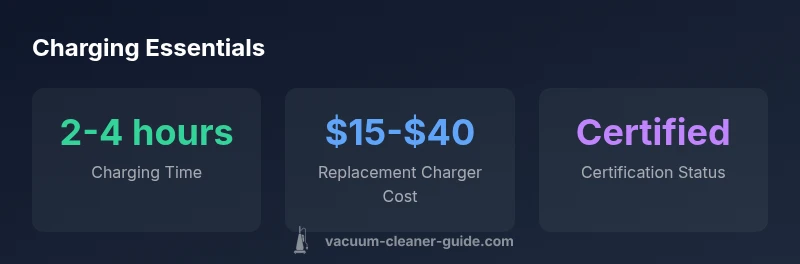
When selecting a replacement, prioritize compatibility, safety, and warranty support. Confirm the charger’s voltage, current rating, plug type, and safety certifications. Look for retailers with clear return policies and documented compatibility lists. If you expect to use multiple Dyson models, consider a certified charger that specifically lists compatibility with each model in your household. Finally, read user reviews for real-world performance and reliability metrics. A thoughtful buying approach reduces the risk of compatibility issues and battery damage over time.
dataTableQualityNotesForBodyBlockOnlyOnlyCannot
dataTableRationaleForBodyBlockOnlyOnlyCannot
Charger options and considerations
| Charge Accessory | Typical Use Case | Notes |
|---|---|---|
| Official Dyson Charger | Daily charging | Best compatibility and warranty protection |
| Certified 3rd-Party Charger | Occasional charging when original unavailable | Must meet Dyson specs and safety standards |
| Non-certified Charger | Any charger | High risk of battery damage or safety hazards |
FAQ
Do I need to use an official Dyson charger for my cordless vacuum?
In most cases, using the official Dyson charger is recommended to ensure optimal charging, safe operation, and warranty protection. If you choose a third-party option, ensure it is certified for your exact model and has the appropriate safety markings.
For safety and warranty, start with the official Dyson charger, or a certified model listed as compatible with your vacuum.
Can I use a third-party charger with my Dyson vacuum?
You can use a certified third-party charger if it explicitly states compatibility with your Dyson model and carries recognized safety certifications. Avoid generic or unverified adapters to reduce risk of battery damage or safety issues.
Yes, but only if it’s certified for your model and has safety marks.
What should I look for when buying a charger?
Look for model compatibility, correct voltage/current ratings, genuine labeling, safety certifications, and a reasonable warranty or return policy. Verify the seller’s reputation and ensure you have clear documentation showing compatibility with your Dyson model.
Check compatibility, safety certs, and return policy before buying.
What are the signs of a bad charger or battery after charging?
Signs include slow charging, overheating, a hot charger, a swollen battery, or the vacuum failing to hold a charge. If you notice any of these, stop using the charger and consult Dyson support or a qualified technician.
If charging is slow or the charger gets very hot, stop and check compatibility.
Does charging time vary by Dyson model?
Yes, charging times depend on model and battery capacity. Expect variations between smaller V-series units and larger power-dense models. Always refer to the user manual for your specific model.
Charging time varies by model; check your manual for exact figures.
“Using the correct charger isn't just about speed—it's essential for battery health and overall safety. When in doubt, follow Dyson's official guidance.”
The Essentials
- Always prefer official Dyson chargers or certified equivalents.
- Verify model compatibility before buying a charger.
- Avoid using non-certified adapters to protect battery health.
- Understand warranty implications when using third-party accessories.
- Keep the charging area cool, dry, and free from obstructions.