What Causes Vacuum Cleaner to Overheat: Troubleshooting Guide
Discover the common causes of vacuum cleaner overheating and proven fixes. This expert troubleshooting guide from Vacuum Cleaner Guide helps homeowners and pet owners prevent damage and restore safe, efficient suction.


Common overheating culprits are airflow blockages, a full bag or clogged filters, and blocked hoses. Start by inspecting the air path, emptying the bag, and cleaning filters. If the vacuum still overheats after cooling, stop using it and seek professional service for motor or electrical issues.
What causes vacuum cleaner to overheat
When you notice your vacuum growing hot, the first question is: what causes vacuum cleaner to overheat? According to Vacuum Cleaner Guide, overheating is most often the result of airflow restrictions and overloading the motor. A vacuum is an air pump; as air moves through the filter, bag, hose, and exhaust, any constriction makes the motor work harder and generates more heat. Common culprits include a full bag, a clogged filter, a blocked wand or hose, or a clogged brush head. In pet-owner households, fur and hair can rapidly build up in the exhaust and reduce airflow. Other factors, such as using the vacuum on thick carpets with maximum suction, can also push the motor beyond its comfortable thermal limit. If overheating becomes a pattern, you’re likely dealing with more than a simple clog; repeated heat buildup can shorten your vacuum’s life and void warranties if not addressed.
Airflow bottlenecks: bags, filters, and vents
Airflow is the motor’s lifeblood. Each component in the path (bag, filters, hoses, and exhaust vents) must breathe freely. A full bag or dustbin means the motor must pull harder, turning energy into heat. Clogged or worn filters restrict air and trap debris, which also heats the system. Hoses and wands can trap debris when owners skip the occasional cleaning, and blocked vents on the body or head allow hot air to recirculate instead of escaping. Pet households typically report faster overheating due to fur buildup in the filter cage and around the exhaust. Regular inspection of the entire airflow path—bag capacity, clean filters, cleared hoses, and open exhaust—usually resolves most overheating cases. To prevent recurrences, replace disposable filters as recommended, and wash reusable filters per the manufacturer’s instructions. Never operate the vacuum with an obvious blockage; continuing to pull air through a clog compounds heat and can damage the motor.
Mechanical wear and load: belts, brush rolls, and motor load
Even with clean airflow, overheating can arise from mechanical wear or excessive load. A worn drive belt or slipping brush roll increases resistance and causes the motor to draw more current, generating heat. Inspect the brush roll for hair and fibers wrapped around it; a clogged brush head also reduces suction efficiency and adds strain. If the vacuum is designed with adjustable suction or height, operating on high settings on heavy surfaces (like dense carpets or pet bedding) increases motor load. In multi-floor homes, frequent transitions between surfaces can surprise the motor if you don’t adjust settings. Over time, the motor windings can degrade, leading to heat accumulation. If you notice a burning smell or visible smoke, discontinue use immediately and unplug the unit. Addressing worn belts or damaged motor components usually requires professional service.
Diagnosing overheating: at-home checks, step by step
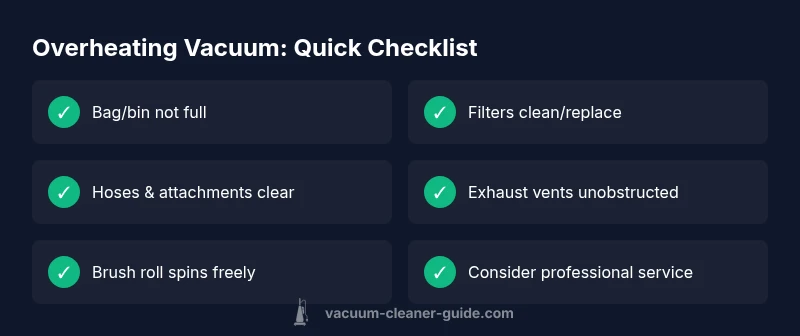
Start with the simple checks you can do safely: unplug the vacuum, inspect the bag or bin and replace if full, examine the filters and clean or replace them, and look for blockages in hoses, wand, and attachments. Next, check the brush roll for hair or threads that could spool around the axis. Ensure the exhaust vent is clear and that there are no kinks in the hose. Run the vacuum for a short test cycle on a small area to see if it heats quickly again. If it does, move to the more involved steps: inspect the belt tension, listen for unusual grinding, and check for motor overheating signs such as a consistently high surface temperature or a persistent odor. If you’re unsure at any point, it’s safer to stop and consult the manual or a professional.
Prevention and maintenance to avoid overheating
Preventing overheating starts with a regular maintenance routine. Schedule monthly checks for air paths, including bags, bins, filters, hoses, and exhaust. Replace disposable filters as recommended; wash reusable filters if applicable. Clean the brush head and remove tangled hair and fibers frequently. Use the correct setting for the surface you’re cleaning, especially avoiding maximum suction on thick carpets for extended periods. Store tools in a dry area to prevent dust ingress and check for wear on critical components like belts and seals. If you rely on your vacuum heavily in a pet-filled home, consider adding a preventive service plan to catch worn parts before failure.
Safety reminders and when to call a professional
Never operate a vacuum that emits a burning smell, smoke, or unusual noises. Unplug first, then inspect but do not disassemble components you are not trained to service. If basic troubleshooting does not resolve the overheating, or if the motor or belt shows signs of damage, contact a qualified technician or the manufacturer’s service center. Prolonged misuse can void warranties. Regular maintenance and prompt repairs protect your vacuum’s longevity and prevent heat-related failures.
Real-world scenarios and quick decisions
Homeowners often encounter overheating after moving from hard floors to deep pile carpets without adjusting suction or height. In these cases, switching to a lower suction setting and working in shorter bursts can prevent heat buildup. Pets can accelerate clog formation; a quick daily check of the filter and hose helps. If you’re seeing frequent heat buildup across different surfaces, it’s time to perform a full diagnostic and consider parts replacement rather than continuous heavy use.
Steps
Estimated time: 45-75 minutes
- 1
Power down and safety check
Unplug the unit and disconnect from any power source. Remove the dust bag or bin and inspect for obvious clogs. This first step prevents injury and avoids triggering further blockages while you diagnose.
Tip: Always start with safety—unplug before touching moving parts. - 2
Check air path and bag
Inspect the bag/bin capacity; replace if full. Examine the filter(s) and clean or replace as needed. Ensure there are no kinks in hoses and that the wand is clear of debris.
Tip: Keep spare filters on hand for quick swaps during maintenance. - 3
Inspect brush head and belt
Tilt the vacuum head to inspect the brush roll for hair and fibers. If the belt looks cracked or stretched, replace it and spin the brush by hand to confirm it moves freely.
Tip: Replace the belt only with a compatible model from the manufacturer. - 4
Clear exhaust and test
Ensure the exhaust vent is free from obstructions and reassemble. Run a short test cycle on a small patch to observe heat buildup. If it remains cool, gradually test larger areas.
Tip: Do not run the unit for long periods while it’s still hot. - 5
Adjust suction and surface setting
If cleaning thick carpet, lower the suction or switch to a lower setting. Changing the height or suction reduces motor load and heat generation.
Tip: Use bursts of cleaning rather than continuous sweeps on high-pile surfaces. - 6
Professional assessment if needed
If overheating persists after these steps, the issue may be motor or electrical components. Schedule a professional service appointment to prevent further damage.
Tip: Document symptoms and maintenance performed to aid the technician.
Diagnosis: Machine overheats during cleaning sessions
Possible Causes
- highAirflow blockage from a full bag, clogged filters, or blocked hose
- highBlocked or restricted exhaust or intake path
- mediumOverloading on high-pile carpet or using maximum suction for extended periods
- lowWorn belt or jammed brush roll causing additional resistance
Fixes
- easyEmpty bag/bin and replace or clean filters; clear all blockages in hoses and attachments
- easyInspect and clear exhaust pathways; ensure vents are unobstructed
- easyReduce suction or adjust height when cleaning heavy surfaces; avoid continuous max suction
- mediumCheck belt condition and brush roll; replace worn belt or remove hair buildup around brush
- hardIf overheating persists, have the motor inspected by a professional
FAQ
What are the most common causes of vacuum overheating?
The most common causes are airflow blockages from full bags and clogged filters, plus blocked hoses or vents. Excessive suction on heavy surfaces can also heat the motor. Regular maintenance usually resolves these issues.
Common overheating causes are airflow blockages and heavy suction on tough surfaces. Regular maintenance typically fixes them.
Can a full dust bag cause overheating?
Yes. A full bag or bin restricts airflow, forcing the motor to work harder and generate more heat. Replacing or emptying the bag and cleaning the filters often resolves the issue.
A full bag reduces airflow and makes the motor heat up. Emptying the bag and cleaning filters usually fixes it.
Is a clogged filter the main culprit for overheating?
Clogged or dirty filters significantly restrict airflow, contributing to overheating. Replacing or cleaning filters is a quick, effective remedy.
A clogged filter restricts airflow and can cause overheating. Clean or replace it to fix the problem.
How do I cool down a hot vacuum quickly?
Unplug the vacuum, allow it to cool completely, and then remove any blockages and clean filters before testing again. Avoid running it while hot.
Unplug, let it cool, then clear blockages and test again. Do not use it while it's hot.
Should I keep using a vacuum on high pile carpet if it overheats?
No. Prolonged use on high-pile carpet at maximum suction increases motor load. Switch to lower suction and shorter cleaning bursts to prevent overheating.
Avoid max suction on high-pile carpet; use gentler bursts and lower suction.
When should I replace the belt or call a technician?
If the belt shows wear or the brush doesn’t rotate freely, replace it. If overheating persists after basic maintenance, schedule professional service.
If the belt is worn or the brush doesn’t spin, replace it. If it still overheats, see a pro.
Watch Video
The Essentials
- Identify airflow blockages early to stop overheating
- Regular maintenance reduces heat buildup
- Use proper settings on different floor types
- Replace worn belts and repair brushes promptly
- Seek professional help if overheating persists