Vacuum Cleaner Filter Replacement: A Practical Guide
Learn how to replace your vacuum cleaner filter with confidence. This guide covers filter types, compatibility, and a safe, step-by-step replacement process for homeowners and pet owners in 2026.


To replace a vacuum cleaner filter, unplug the unit, locate the filter housing, remove the old filter, inspect for damage, install a new filter oriented correctly, reseal the housing, and run a brief test cycle. Keep a spare filter on hand and replace on a regular schedule based on usage, pets, and floor type.
Why filter maintenance matters
Keeping the filter in good condition is one of the simplest, highest-impact maintenance tasks for any vacuum. A clean filter preserves suction, reduces strain on the motor, and helps control dust and allergens in your home — something homeowners and pet owners care about, especially with kids or furry friends around. According to Vacuum Cleaner Guide, consistent filter maintenance is linked to longer appliance life and steadier performance, even in households with pets. This section explains why you should schedule regular checks and what can go wrong when filters are neglected.
Most vacuum cleaners rely on a combination of filters to trap dust, hair, and debris. Over time, filters become clogged or damaged, which forces the motor to work harder and decreases overall efficiency. If you skip replacement, you may notice weaker suction, more particles circulating back into the room, and louder operation. On the upside, replacing a dirty filter is usually quick, inexpensive, and yields immediate improvements in airflow and odor control. This simple step also protects your air quality, a key concern for allergy sufferers and households with infants.
- Quick sanity checks: inspect around the filter housing for visible debris before every use, and replace if the filter looks discolored or torn.
- Frequency depends on usage: high-traffic homes and pet households typically benefit from more frequent changes, while light-use environments may go longer.
The Vacuum Cleaner Guide team emphasizes that you don’t need to be a DIY expert to do this correctly. With the right replacement filter and a few careful steps, you can maintain strong suction and keep dust at bay while extending the life of your vacuum.
Filter types and compatibility
Filter technology varies a lot between brands and models. Common options include foam, felt, paper, pleated, and HEPA-rated filters. Some vacuums use a primary filter and a secondary pre-filter, while others rely on a single unit. Before buying, check your model’s manual or manufacturer site to confirm the exact filter type, size, and any special installation notes. Replacing with an incompatible filter is a quick way to lose suction or trigger warning lights.
A lot of households encounter this scenario when upgrading or replacing old units: the wrong filter can seal poorly, allowing unfiltered air to bypass the filter and reduce cleaning effectiveness. When selecting a replacement, you’ll often encounter terms like washable vs disposable and various MERV or HEPA ratings. In general, HEPA filters improve particle capture and are worth considering for allergy-prone homes, while washable options can be more economical but require proper drying to avoid mold.
Vacuum Cleaner Guide analysis shows that many standard home vacuums use pleated paper or foam combined with a secondary pre-filter. Always verify compatibility and ensure you’re purchasing a filter that matches your model’s dimensions, orientation, and airflow path. When in doubt, contact customer support or consult the user manual for model-specific guidance.
How to locate and access the filter
Accessing the filter often involves opening the dirt canister or removing a panel on the vacuum’s body. Start by unplugging the unit and placing it on a clean, dry surface. Remove any debris from the exterior, then locate the filter housing—this is typically situated near the dirt cup, behind a door, or under a cowl that covers the motor.
Inside the housing, you’ll usually see one or two filters. Some designs require you to press latches or unscrew a small retaining ring. If you’re unsure, consult the manual or look for model-specific diagrams. When removing a filter, handle it carefully to avoid spreading dust, and consider placing the unit over a trash can or bag to minimize mess.
How to choose the right replacement filter
Selecting the correct replacement involves matching size, shape, and filter type to your vacuum’s design. Look for a filter that slides or fits snugly into the housing and aligns with airflow direction arrows on the filter or the appliance. HEPA-rated filters are worth consideration for improved particle capture, especially if anyone in your home has allergies or asthma. If you have pets, a higher-efficiency or multi-layer filter can help trap fur and dander.
Always compare the replacement against the model number printed on the vacuum or in the manual. Some brands use modular systems where the same basic filter fits a family of models; others require exact part numbers. When ordering, it’s safer to purchase from reputable retailers and verify return policies in case the fit isn’t exact.
Preparing for replacement: cleaning and inspection
Prior to installing a new filter, take a moment to clean the housing and seals. Use a dry cloth or a soft brush to remove accumulated dust from the housing interior and the filter seat. Avoid using water or cleaners on the motor housing or electronic components. Let any damp surfaces dry completely before reassembly to prevent mold or damage.
Inspect the housing for cracks, torn gaskets, or deformation that could compromise seal integrity. A damaged seal can allow unfiltered air to bypass the filter, negating the benefits of replacement. If you find wear, replace the seal or the entire housing as needed. After cleaning and inspection, you’re ready to install the new filter.
Step-by-step replacement overview
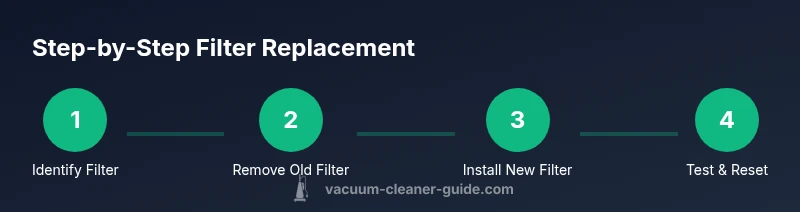
Replacing a vacuum filter is a straightforward maintenance task that most owners can complete in a short session. This overview helps you prepare for a smooth replacement: confirm you have the correct filter, unplug the unit, open the housing, remove the old filter, clean the seat, dry any damp areas, insert the new filter in the correct orientation, reseal the housing, and run a quick test on low power to confirm airflow is restored. If your model has indicator lights for filter life, reset or acknowledge them after replacement.
Throughout the process, protect your lungs by wearing a simple mask if you’re sensitive to dust, and clean up any spilled debris promptly. Properly disposed of used filters and keeping spare filters on hand will streamline future maintenance.
Post-replacement care and maintenance
After replacing the filter, monitor the vacuum’s suction and noise for a short period to confirm the change is effective. If suction remains weak, recheck the filter fit, seal integrity, and housing cleanliness. Store spare filters in a dry, cool place away from sunlight to prevent material degradation. Periodic checks can prevent blockages and prolong motor life, especially in homes with high dust or pet hair loads.
Finally, consider pairing filter maintenance with other routine tasks like brush roll cleaning and dust cup emptying. This holistic approach keeps your vacuum performing at its best and helps maintain indoor air quality for your family and pets.
Tools & Materials
- Replacement filter(Exact size and type for your model; bring a spare in a commonly used size.)
- Microfiber cloth(For wiping the housing and seat without leaving fibers behind.)
- Soft brush or dry sponge(Gently dislodge stubborn dust from seams and crevices.)
- Small screwdriver(Only if your model uses screws to access the filter.)
- Owner's manual or model quick-start(Use for model-specific filter type and orientation guidance.)
Steps
Estimated time: 15-25 minutes
- 1
Disconnect and locate the filter
Unplug the vacuum and place it on a stable surface. Open the dirt canister or the access panel to locate the filter housing. Confirm you’re looking at the correct filter for this model before proceeding.
Tip: Never work near the motor while powered; unplug first to prevent accidental startup. - 2
Remove the old filter
Gently remove the filter from its seat, holding it from the edges to avoid tearing. Check the filter for tears or shrinkage and set it aside for disposal.
Tip: If debris is packed around the filter, use a dry brush to loosen it before removal. - 3
Inspect housing and clean
Wipe the filter seat and interior surface with a microfiber cloth. Clear any dust from seams and gaskets. Let any damp areas dry fully to prevent mold.
Tip: Look for cracks or worn seals that could compromise filtration. - 4
Choose and prepare the new filter
Select a replacement that matches your model and type (HEPA, pleated, etc.). Remove packaging and inspect the new filter for any manufacturing debris before installation.
Tip: Verify the orientation marks or arrows on the filter align with the housing. - 5
Install the new filter correctly
Insert the new filter fully into its seat, ensuring it sits flush and oriented as designed. Avoid tilting or forcing it into place.
Tip: If your model uses two filters, replace both in their respective slots. - 6
Reassemble, test, and monitor
Reattach any covers, reconnect power, and run a short test cycle on low power to verify airflow. Listen for signs of improper seating or unusual noise.
Tip: Reset any filter-life indicator if your model has one.
FAQ
How often should I replace vacuum filters?
Replacement frequency depends on usage, household environment, and pet presence. Generally, check the filter monthly and replace when you notice reduced suction or visible dirt buildup.
Check the filter monthly and replace when it looks dirty or suction drops.
Can I wash or reuse disposable filters?
Most disposable filters should not be washed. If the filter is labeled washable, use the manufacturer’s washing instructions and ensure it is completely dry before reuse.
Only wash filters that are clearly labeled as washable and dry completely before reusing.
What if suction doesn’t improve after replacement?
Check the seal around the filter housing for gaps, inspect the hose and wand for blockages, and ensure the brush roll is not tangled. If problems persist, consult the manual or support.
If suction remains weak, inspect seals, hoses, and the brush roll for blockages.
How do I know which replacement filter to buy?
Refer to your model’s manual or the manufacturer’s website for the exact part number and compatible filter types. Use reputable retailers and verify fit before purchase.
Check the model manual for the exact part number and buy the compatible filter.
Are there filters designed for pet hair?
Yes. Many brands offer filters with higher hair-holding capacity or multi-layer filtration designed to trap pet hair and dander more effectively.
Many filters are designed to trap pet hair and dander more effectively.
Watch Video
The Essentials
- Identify filter type and compatibility before buying.
- Clean the housing and seats to ensure a good seal.
- Install new filters with correct orientation for optimal airflow.
- Test the vacuum after replacement to confirm performance.
- Replace on a regular schedule based on usage and pets.