Can You Put Vacuum Cleaner in Trash? A Practical Disposal Guide
Learn safe, compliant disposal for old vacuum cleaners, including recycling, donation, and proper handling of batteries and electronics. This guide from Vacuum Cleaner Guide covers rules, steps, and alternatives.


Can you put vacuum cleaner in trash? The short answer is: not usually—special disposal steps are often required. Modern vacuums contain batteries, electronics, and filters that may be recyclable or hazardous if mishandled. Always check your local rules, use a certified e-waste program if available, and consider donating or recycling a working unit rather than trashing it.
Can you put vacuum cleaner in trash
The question can you put vacuum cleaner in trash isn't a simple yes or no everywhere. In many communities, disposing a vacuum requires special steps because of batteries, electronic components, and filters. In this guide, you will learn safe, compliant ways to dispose of old vacuums, and how Vacuum Cleaner Guide evaluates the options. According to Vacuum Cleaner Guide, improper disposal can create hazards and complicate recycling efforts. The goal here is to outline practical, legal routes to reduce waste and protect your home. This guidance is especially relevant for homeowners and pet owners who want to minimize indoor pollutants and avoid costly mistakes at the curb.
Why disposal standards matter
Disposing a vacuum may seem harmless, but it can affect the environment and public safety. Vacuum cleaners contain plastics, metal, and sometimes batteries that require separation and recycling. When you ask can you put vacuum cleaner in trash, the answer depends on local rules and the type of unit. The wrong approach can lead to hazardous waste streams or fines in some jurisdictions. Vacuum Cleaner Guide Analysis, 2026, notes that most communities now favor electronics recycling programs, bulky-item pickup with proper labeling, or certified e-waste facilities. By following approved channels, you ensure materials like plastics and metals are recovered, and batteries or chargers are handled to prevent leaks or fires. The aim is to minimize landfill impact while maximizing reuse and recycling, which aligns with homeowner responsibilities and pet-owner concerns about indoor air quality and household safety.
Batteries and electronics inside vacuums
Many modern vacuums include rechargeable batteries, circuit boards, and lithium-ion cells. These components require careful handling because damaged batteries can pose fire risks or leak toxic materials. Before disposing, verify whether the unit contains a battery that must be removed and recycled separately. If you cannot safely remove a battery, do not attempt to disassemble the unit; instead, bring it to an approved electronics recycling facility. Vacuum Cleaner Guide analysis emphasizes prioritizing programs that explicitly accept household electronics and batteries, ensuring disposal complies with local and national rules.
Explore safe disposal channels
Safe disposal channels for vacuums vary by locale. Common options include certified e-waste facilities, municipal electronics recycling events, and retailer take-back programs. Some regions offer bulky-item pickup with a dedicated tag, while others require you to drop off at a designated recycling site. Always use the channel that is officially approved for electronics and batteries. This reduces the chance of improper material separation and protects your home from potential hazards during transport. Vacuum Cleaner Guide recommends starting with your city or county waste management site to identify approved options.
How to prepare a vacuum for disposal
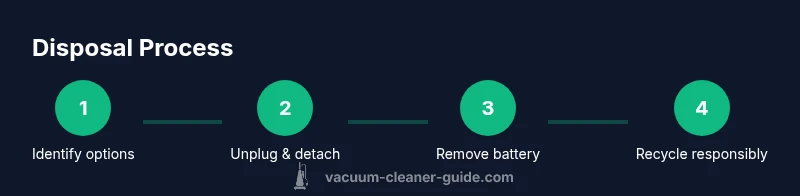
Preparation reduces hazards and speeds up processing. Start by unplugging the unit and removing any external power sources. If possible, detach the dustbin, filters, and hoses, and set aside removable components for separate recycling. If the device contains a battery, remove it following the manufacturer’s guidance or local program rules. Keep loose dust contained in a bag or container to prevent spills. Finally, package the unit securely in a sturdy box or bag labeled electronics recycling and transport it to the chosen disposal channel. These steps help prevent leaks and keep waste streams clean.
Working vs non-working units: donate, recycle, or repair
If the vacuum still runs, consider donating to a charity, school, or second-hand store. Working units can be valuable for households that cannot afford a new vacuum or for pet owners who need reliable equipment. If the unit is malfunctioning but repairable, obtain a quote and compare it to the cost of a replacement. Recycling is the second-best option for non-working units, with batteries removed and components separated for safe processing. Always communicate clearly with the recipient or recycler about the condition of the device to avoid misrepresentation and ensure proper handling.
Donating or selling second-hand vacuums responsibly
Before donating, test the unit and clean it to improve its resale value. Provide basic details about model, features, and any known issues to help recipients assess suitability. Some retailers and charities offer take-back programs specifically for pet-hair vacuums, which can be a win for households dealing with pet dander and allergens. Ensure you obtain a receipt for tax or warranty considerations where applicable. If you sell, provide honest photos and a clear description of condition to avoid disputes and returns.
When trash is the only option and how to minimize impact
If disposal through sanctioned channels is not available, you may see the unit treated as household waste in rare cases. In such scenarios, minimize environmental impact by removing batteries, even if not easy, and bagging plastics separately for recycling. Never burn or heat plastic housings, and avoid dumping dust or fluids on the ground. While trashing should be a last resort, following safe handling practices protects your family and community.
The Vacuum Cleaner Guide verdict
The Vacuum Cleaner Guide team recommends prioritizing certified e-waste programs and retailer take-back options over curbside trash. By using approved channels, you reduce environmental harm and keep hazardous components out of landfills. Our approach also emphasizes donating or repairing working units when feasible, which aligns with sustainable practices and long-term cost savings for households. The goal is to treat vacuums as valuable resources rather than disposable items.
Tools & Materials
- Unplugged vacuum cleaner(Ensure the unit is fully disconnected from any power source)
- Safety gloves(Protect hands when handling dusty bins)
- Screwdriver set(Only if you need to access battery or removable parts)
- Non-conductive battery container(Store removed batteries safely (if applicable))
- Dust bag or bagging material(Contain dust during handling)
- Sturdy box or bag for recycling(Protects the unit during transit)
- Labels or tape(Mark electronics recycling clearly)
- Local recycling information (print or digital)(Have disposal options handy)
Steps
Estimated time: 45-90 minutes
- 1
Identify disposal options
Begin by locating approved electronics recycling options in your area. Look for e-waste drop-offs, retailer take-back programs, or municipal bulky-item pickup. This ensures your unit is processed safely and in compliance with local laws.
Tip: Check the city waste management site for a dedicated electronics recycling page before pulling the unit from storage. - 2
Unplug and power down
Unplug the vacuum from any outlet and remove any battery or power pack if safe to do so. If the battery is not easily removable, do not force it; seek a program that accepts non-removable units.
Tip: Always work on a dry surface and avoid touching any exposed wiring. - 3
Detach removable components
Take off the dustbin, filters, hoses, and attachments. Place these parts in separate recycling streams if possible, since some materials have dedicated recycling channels.
Tip: Keep small parts in a labeled bag to prevent loss during transport. - 4
Contain and secure dust
Empty and bag the dust collection area to avoid spills. Seal bags or containers to prevent dust leakage during handling and transit.
Tip: Avoid shaking the unit aggressively to minimize dust release. - 5
Remove the battery safely
If your unit has a removable battery, detach it following the manufacturer instructions or program guidelines. Store in a non-conductive container until you reach the recycling point.
Tip: Never pierce or crush a lithium-ion battery; improper handling can cause short circuits. - 6
Package for transport
Wrap and secure the main unit in a sturdy box or bag labeled electronics recycling. Include a note about battery status and any attachments you are sending.
Tip: Choose a box with ample padding to prevent crushing during shipment. - 7
Choose a disposal channel
Transport the unit to the selected program or arrange a pickup. If possible, get confirmation or a receipt for your records.
Tip: Ask for a disposal confirmation or tracking number for future reference. - 8
Verify disposal completion
Ensure the electronics recyclers or program confirms the unit was accepted and processed. Retain receipts for audits, warranties, or tax purposes.
Tip: Keep digital copies of all disposal documents for easy access.
FAQ
Is it illegal to throw away a vacuum in the regular trash?
In many places, yes. Lawful disposal usually requires electronics recycling or a take-back program. Always check local rules to avoid fines and environmental harm.
In many places, you can't just trash a vacuum. Check local rules for electronics recycling to stay compliant.
Can I donate a broken vacuum?
Donating a broken vacuum is generally discouraged unless the recipient accepts non-working items for parts or repair. Always disclose the unit’s condition upfront.
You can donate a vacuum only if the recipient accepts non-working units and you clearly report its condition.
Do all vacuums have batteries that require special handling?
Not all vacuums have batteries, but many cordless or bagless models do. If a battery exists, remove it safely or use a program that accepts batteries as a separate stream.
Many cordless vacuums have batteries; remove if safe or use a program that handles batteries separately.
Where can I recycle my old vacuum?
Start with your city’s waste management site to locate certified electronics recyclers, drop-off centers, or retailer take-back programs near you.
Check your city’s waste site for electronics recyclers or take-back programs nearby.
Will removing the battery void the warranty?
Battery removal typically follows manufacturer guidelines and may affect warranties if done improperly. Consult the manual or the retailer before removing hardware.
Removing the battery might affect warranty if not done per guidelines; check the manual or retailer policy.
What should I do with filters and bags?
Recycle or dispose filters and bags according to local rules; some streams accept them separately due to material differences.
Dispose or recycle filters according to local rules; some streams treat them separately.
Watch Video
The Essentials
- Dispose electronics through approved channels.
- Remove batteries when safe and possible.
- Don’t mix vacuum parts with regular trash.
- Donations and repairs are preferred when feasible.