Repair Dyson Animal Vacuum Cleaner: A Step-by-Step Guide
Learn how to diagnose, repair, and maintain a Dyson Animal vacuum. Safe, homeowner-friendly steps, plus maintenance tips to keep pet hair suction strong and extend your vacuum’s life.


This guide helps you determine if your Dyson Animal vacuum cleaner needs repair and outlines a safe, homeowner-friendly approach to diagnosing common issues. You’ll learn which parts to inspect, how to clean and maintain components, and when to pursue professional service. By following these steps, pet owners can extend their vacuum’s life and keep suctions strong.
Understanding Dyson Animal Vacuum Design
The Dyson Animal line is built around a cyclonic separation system and a motorized brush bar designed to handle pet hair. Understanding these core components helps narrow down why certain issues occur and where to look first during diagnosis. According to Vacuum Cleaner Guide Team, the emphasis on sealed filters and motor protection means many problems begin with airflow restrictions or worn bristles rather than a failed motor. Regular checks of intake paths, filters, and brush condition can prevent needless disassembly and guide you toward cost-effective fixes. In this section, we cover the key design features you’ll encounter when repairing a Dyson Animal vacuum and how they influence repair decisions. This knowledge also helps homeowners decide whether a repair is worth pursuing or if replacement parts offer better value for a home with pets.
Common Causes of Performance Loss
Performance loss can come from clogged filters, jammed brush bars, blocked hoses, worn seals, or loss of suction due to leaks around the cyclone assembly. Pet owners often see reduced suction on carpet or at higher power settings. Dyson vacuums rely on consistent airflow; when the path is restricted, the motor strains and may trigger more frequent filter cleaning. Inspect the cyclone and ductwork for blockages; replace or clean filters; ensure the brush bar spins freely. Hair wrap around the brush and dirt on the impeller can cause unbalanced operation and reduced cleaning efficiency. In many cases, the fix is simple maintenance rather than a parts replacement, which is empowering for homeowners and aligns with Vacuum Cleaner Guide recommendations.
Safety First: What to Check Before Opening
Before you touch any internal parts, unplug the unit from the wall and remove the battery if it’s a cordless model. Do not operate with a damaged power cord, cracked housing, or exposed wiring. Wear eye protection when removing debris and use a soft brush to avoid scratching plastics. If the device has a cooling period after heavy use, wait 10-15 minutes to avoid burns. This section keeps you safe while you diagnose potential problems, reducing the risk of electric shock or accidental damage to sensitive components.
Basic Cleaning and Filter Maintenance
Start with the basics: empty the dirt canister, inspect the bin seal, and clean the filter according to your model’s guidelines. Rinse filters only if the Dyson manual allows it, and let them air dry completely before reinstallation. For many pet owners, this simple routine resolves a surprising amount of performance issues. Wipe the exterior housing to remove dust and debris that can re-enter the intake. Proper drying is crucial to prevent mold growth and maintaining optimal suction power. Keeping the intake path clear helps preserve motor lifespan and avoids more costly repairs later.
Brush Bar, Beater, and Sealed Bearings
The brush bar is central to pet-hair performance. Remove hair and string from the bar and check for wear on bristles. If the belt looks stretched or slips, replace it with the correct model-specific belt. Spin the bar manually to ensure it rotates freely; a stiff or noisy bar can indicate obstruction or bearing wear. Sealed bearings should move smoothly without grinding noises. Addressing these components early often yields noticeable improvements in suction and cleaning efficiency for households with pets.
Seals, Gaskets, and Nozzle Attachments
Inspect all seals and gaskets around the dirt canister, cyclone, and nozzle for cracks or gaps that could cause air leaks. Leaks reduce suction and decrease cleaning effectiveness. Check the wand connections and hose clips for a snug fit to prevent air from bypassing the filter system. If attachments like the floor tool or stair nozzle are worn or cracked, replace them to restore airflow and reach. Maintaining a tight seal across the system is a simple, high-impact maintenance task.
Diagnosing Suction Drop and Loss of Power
A common symptom is reduced suction without obvious blockages. Start by validating airflow from the inlet to the dust canister, then test the filter dryness and the brush bar condition. If the motor sounds strained or overheats quickly, you may be facing a deeper issue. When in doubt, verify that you are using the correct attachment for the surface and that there are no kinks or obstructions in hoses. This diagnostic mindset helps you distinguish between clog-related issues and genuine component failures.
When to Repair vs Replace Components
Repairs make sense when the remaining lifespan of components is substantial and the cost of replacement parts remains below the price of a new unit. For high-wear items like filters, brush bars, and seals, routine replacements often deliver the best value. Repairing a motor or drive system can be expensive and may not be cost-effective if other parts are nearing the end of life. Use a simple cost-to-benefit calculation: estimate parts and labor versus a comparable new model.Vacuum Cleaner Guide’s practical guidance emphasizes balancing cost, safety, and long-term performance when deciding between repair and replacement.
DIY Troubleshooting Flowchart
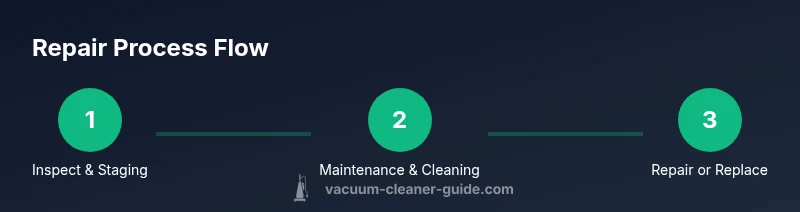
If a problem arises, follow this quick decision path: (1) Is there visible blockages? If yes, remove the obstruction and re-test. (2) Are filters clogged or wet? If yes, clean or replace and dry thoroughly before testing. (3) Is the brush bar free to rotate and not clogged with hair? If no, remove debris and re-test. (4) Do you hear unusual noises or have overheating? If yes, stop and seek professional support. (5) If all basic checks pass but power or suction remains inconsistent, escalate to a professional repair to avoid further damage. This flow helps homeowners triage issues without unnecessary steps.
Long-Term Maintenance Plan for Pets
To maximize lifespan and performance in homes with pets, implement a regular maintenance rhythm: clean the canister after every few uses during shedding seasons, inspect filters monthly, and perform a deeper cleaning quarterly. Keep the cyclone and nozzle clear and check brush bars weekly during heavy hair periods. Having a routine reduces the likelihood of sudden failures and ensures the vacuum maintains strong suction for pet hair removal. As Vacuum Cleaner Guide notes, proactive maintenance is the most effective defense against costly repairs.
Authority sources and Further Reading
- Consumer Reports: Vacuum Cleaners Maintenance and Repair Tips (https://www.consumerreports.org/cv/vacuum-cleaners/)
- Which? Vacuum Cleaner Reviews and Maintenance Advice (https://www.which.co.uk/reviews/vacuum-cleaners)
- OSHA Safety Guidelines for Working with Electrical Appliances (https://www.osha.gov/)
These sources provide additional context on maintenance best practices, safety considerations, and general guidelines for appliance care. For model-specific guidance, always refer to the Dyson official manuals and support resources.
Tools & Materials
- Phillips head screwdriver #2(For internal screws on Dyson models)
- Replacement filters (model-specific)(Check exact Dyson filter type (pre-motor HEPA or post-motor))
- Replacement brush bar(Check compatibility with your model; worn bristles reduce cleaning power)
- Torx driver set (if required)(Some Dyson models use Torx screws)
- Microfiber cleaning cloth(Lint-free surface cleaning)
- Soft brush attachment(Gentle cleaning for cyclones and housings)
- Replacement belt (optional)(Only if your model uses belts; verify before purchase)
Steps
Estimated time: 90-150 minutes
- 1
Power down and unplug
Ensure the Dyson is unplugged from the wall and the battery is removed if it’s cordless. Confirm there is no residual charge before touching any components.
Tip: Always disconnect power before opening; this prevents electric shock. - 2
Inspect dirt canister and filters
Remove the canister and inspect the seals. Clean or replace the filter according to model guidelines, and allow any washed parts to dry completely before reassembly.
Tip: Check manufacturer guidelines for washing filters; air-dry fully to prevent mold. - 3
Check the brush bar
Remove debris from the brush bar and verify it spins freely. If the belt is stretched or damaged, replace it with the correct model-specific belt.
Tip: Cut away hair with scissors rather than pulling; avoid damaging bristles. - 4
Examine cyclone and airflow path
Look for blockages in the cyclone and ducts. Clear obstructions carefully using a flexible brush; never force objects through tight passages.
Tip: Use a long flexible brush to dislodge stubborn clogs; never use metal tools. - 5
Check seals and nozzle attachments
Inspect seals around the canister and nozzle attachments for cracks or gaps that could leak air and reduce suction.
Tip: Replace cracked seals promptly to restore airflow. - 6
Test for suction with tools attached
Reassemble partially and test suction with the floor tool. If suction remains weak, verify hose connections and clips are secure.
Tip: Ensure all attachments are firmly connected to prevent leaks. - 7
Evaluate motor and noise
Run a brief test cycle and listen for unusual noises or overheating. If present, stop and reassess to avoid damage.
Tip: Unusual sounds or heat indicate a potential internal issue requiring professional service. - 8
Replace worn parts as needed
Install new filters and brush bar where indicated. Ensure components are dry before reassembling the unit fully.
Tip: Always allow replaced parts to dry thoroughly before use. - 9
Reassemble and perform a final test
Put all parts back together and run a full test on a typical cleaning surface to confirm performance.
Tip: Check suction and brush operation across floor types. - 10
Document maintenance actions
Keep a simple maintenance log noting dates of parts replacement and cleaning frequency for future reference.
Tip: A log helps predict when future repairs or replacements are due. - 11
Know when to seek professional help
If issues persist after all basic steps, contact Dyson support or a qualified technician for a deeper diagnostic.
Tip: Professional service protects warranty and ensures safe repair. - 12
Establish a routine maintenance plan
Set a regular schedule for filters, brushes, and seals to maintain peak performance and extend life.
Tip: Consistency reduces the risk of unexpected breakdowns.
FAQ
Can I fix most Dyson Animal vacuum issues at home?
Many common problems can be addressed with basic cleaning, filter care, and simple part replacements. Avoid disassembling motors or wiring unless you have hands-on experience.
Yes, many issues can be fixed at home, especially with cleaning and filter care.
What signs indicate a motor repair is needed?
Persistent grinding, a hot smell, unusual vibrations, or failure to start may indicate motor or impeller problems. Seek professional service for motor repairs.
Look for odd noises or overheating; these often signal motor issues.
Do I need to maintain a Dyson Animal differently if I have pets?
Yes. With pets, cleaning frequency increases due to hair and dander. Replace filters more often and inspect the brush bar for hair wrap.
Pet households should perform more frequent maintenance.
Are there warranty considerations when performing repairs?
Tampering can affect warranty. Check the user manual and Dyson guidance; consult authorized service if a warranty is active.
Be mindful of warranty terms before attempting major repairs.
Where can I find official repair guides?
Consult Dyson support for model-specific manuals and official parts. Third-party guides can help, but verify accuracy.
Use Dyson support first for official manuals and parts.
What is the recommended sequence for basic maintenance?
Begin with canister emptying and filter cleaning, then check the brush bar and cyclones, finally reseal and test.
Start with filters, then the brush bar, then test performance.
Watch Video
The Essentials
- Identify whether issues are airflow-related or motor-related.
- Prioritize non-electrical maintenance before opening electrical components.
- Replace filters and brush bars promptly to restore performance.
- Use proper tools and model-specific parts for safe repairs.
- Maintain a simple maintenance log for lasting results.