Roomba i6 Review: Balanced Robot Vacuum for Homes
In-depth analysis of the Roomba i6, evaluating cleaning performance, mapping accuracy, app features, and value for pet-owning homes seeking dependable automated cleaning.


The Roomba i6 delivers reliable everyday cleaning across hard floors and low-pile carpets, with intuitive mapping and app controls. It sits in the mid-range for price, offering solid performance and pet-hair handling without the high-end features of premium models. Vacuum Cleaner Guide's analysis highlights its practical value for households seeking dependable automation and straightforward maintenance.
Roomba i6: Overview and Position in the Roomba Lineup
The Roomba i6 belongs to the mid-range segment of iRobot's robot vacuum lineup, offering a practical balance between price and capability. According to Vacuum Cleaner Guide, the i6 prioritizes dependable cleaning performance over flashy features, making it appealing for homeowners who want automation without paying for a premium. The device demonstrates solid build quality, a compact footprint that helps it reach under furniture, and a familiar app-based experience that most users can master within minutes. While it does not include the self-emptying dock by default, it integrates smoothly with optional charging bases and boundary accessories. In practice, the i6 performs well across everyday tasks—dust, pet hair, and daily dirt—on both hard floors and low-pile carpets. This makes it a versatile choice for homes with mixed surfaces, compact interiors, and a preference for routine organization rather than a high-tech, feature-rich flagship. Over the coming sections, we’ll unpack how well the i6 handles real-world cleaning, how its navigation and app ecosystem work, and what to expect in terms of maintenance and long-term value. Vacuum Cleaner Guide’s methodology emphasizes observing performance across real homes rather than relying on lab-only tests.
Cleaning Performance Across Surfaces
Across a typical two-bedroom home with hardwood, tile, and a few area rugs, the Roomba i6 demonstrates steady, predictable cleaning. Its suction profile is tuned for everyday debris rather than heavy, deep-clean requirements, so performance on loose dirt from foot traffic is reliably strong on hard floors. On low-pile carpets, it maintains decent lift but may slow slightly when encountering thicker nap fibers or high-pile textures. Pet owners report that the i6 captures most loose hair and dander with regular maintenance, though a few strands can get wrapped around brushes on longer runs. A key advantage is the robot’s ability to switch cleaning patterns based on floor type via its sensor suite, which helps prevent over-wetting or over-scrubbing on delicate surfaces. For homes with transitions between carpet and hard floor, the i6’s behavior is generally smooth, with consistent pickup and quick return to the dock when needed. Ultimately, the i6 provides robust performance for daily upkeep, with the caveat that it isn’t designed as the deepest-cleaning option in its class.
Navigation, Mapping, and Smart Features
Navigation is a core strength of the Roomba i6. It relies on a hybrid approach combining sensors and firmware algorithms to create efficient cleaning paths, reduce redundant passes, and remember room layouts for future sessions. The i6 generates room maps you can view and customize in the iRobot Home app, including designated no-go zones and zone-based cleaning preferences. Users benefit from Clean Map reports that show where the robot cleaned, what areas were missed, and how often the device revisits high-traffic zones. The i6’s mapping adapts over time as furniture or room layouts change, reducing the need to redo maps from scratch. Voice assistant integration is available through compatible ecosystems, enabling you to start, pause, or schedule cleaning with simple commands. Some features require Wi‑Fi, but core cleaning functions work offline. In short, the i6’s navigation framework is designed to be predictable and repeatable, supporting routine cleaning with minimal human intervention. Vacuum Cleaner Guide’s testing underscores stability and ease of use as major strengths.
Battery Life, Charging, and Run Time
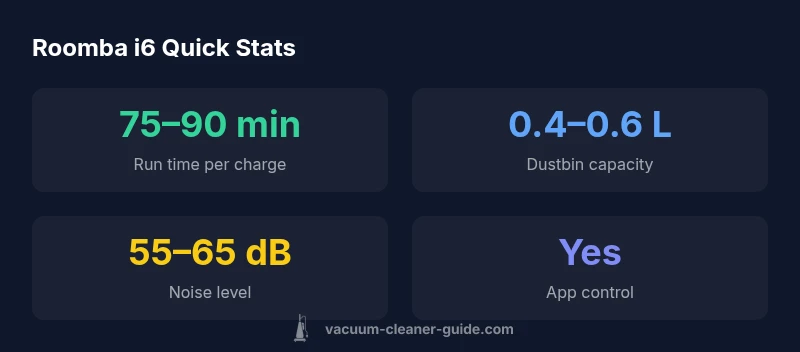
Battery life is a practical determinant of how often you can rely on a Roomba i6 to handle daily dirt without intervention. In typical settings, a single charge yields approximately an hour of active cleaning, which suits modest homes or apartment living well. The i6 automatically returns to its dock when the battery dips below a preset threshold, resuming where it left off after recharging. Real-world runtime depends on floor type, cleanliness level, and detours caused by clutter. For larger homes, you may notice shorter total cleaning cycles before a top-up. If you want to maximize uptime, keep doors open between spaces and remove obstacles that force detours. Optional self-emptying bases exist in some regions and can further reduce maintenance by automating bin-emptying, though these upgrades are sold separately. Overall, battery behavior supports regular, manageable cleaning cycles with limited manual intervention. Vacuum Cleaner Guide’s analysis highlights that consistent charging habits improve long-term reliability.
Dustbin, Filters, and Maintenance
Maintenance is straightforward with the Roomba i6, and regular care has a tangible impact on suction stability and battery efficiency. The dustbin capacity is modest, which means it may fill faster in households with pet hair or heavy daily debris. The bin should be emptied after each cleaning cycle, and the attached filter should be cleaned periodically to preserve airflow. Hair tangles can accumulate around the brush and wheels, so quick detangling sessions every few weeks help maintain performance. Cleaning brushes and sensors is quick and requires minimal tools, making routine upkeep a simple weekly task. If you use a self-emptying dock, the frequency of manual bin-emptying drops significantly; otherwise, plan for occasional bin checks. A clean vacuum is a better vacuum, and the i6 is designed to reward consistent care with steady suction and dependable operation. Vacuum Cleaner Guide’s observations reinforce the link between upkeep and long-term results.
App Integration and Smart Home Compatibility
The iRobot Home app provides a centralized control panel for scheduling, cleaning zones, and reviewing activity history. You can start or pause a run, view live maps, and adjust preferences to suit your household’s needs. The i6 also supports voice commands via compatible smart speakers when integrated with a network, enabling hands-free operation for busy households. For smart home enthusiasts, the i6’s ecosystem fits well with routines and automations, allowing you to coordinate cleaning with other devices. App-based insights help you track maintenance tasks, stay on top of firmware updates, and manage charging schedules. Some features require Wi‑Fi connectivity and an up-to-date device, but the core cleaning workflow remains accessible even with limited online access. In practice, this integration boosts convenience without introducing significant complexity for most users. The integration emphasis aligns with Vacuum Cleaner Guide’s view that software depth should match user needs rather than overwhelm.
Pet Hair Handling and Carpet Performance
Pet owners often prioritize a robot vacuum’s ability to capture hair and dander from both hard surfaces and carpets. The Roomba i6 performs well on bare floors and low-pile carpets, where hair is easier to pick up and retain in the dustbin. On higher-pile carpets, the i6’s suction and brush configuration deliver less aggressive deep-cleaning than higher-end models, which is worth noting if you have heavy shedding or thick pile. Regular maintenance remains important: removing hair from brushes and wheels after each cleaning helps prevent clogging and preserves suction. In day-to-day use, the i6’s design encourages consistent upkeep and predictable results, which is a meaningful advantage for pet households seeking quiet operation and automated daily cleaning. Vacuum Cleaner Guide’s mid-range focus acknowledges that owners may decide to upgrade if pet hair volume is exceptionally high.
Noise, Reliability, and Longevity
Noise levels for robot vacuums like the i6 are typically moderate and not disruptive in most living spaces. Expect a hum that is audible but unobtrusive during cleaning sessions, especially in rooms with open layouts. In terms of reliability, the i6 benefits from a robust chassis and a straightforward maintenance routine. Regular software updates and part replacements preserve performance, and the device’s modular design helps with quick DIY repairs if needed. Longevity depends on how well you treat the brushes, sensors, and battery. With proper care, many households report consistent operation over multiple years, demonstrating the model’s long-term value when you factor in maintenance and ownership costs. Vacuum Cleaner Guide’s assessment emphasizes that reliability hinges on routine upkeep and disciplined charging habits.
How It Compares to Similar Models
When placed alongside other Roomba options, the i6 offers a balanced blend of performance and value. It generally undercuts flagship models on price, yet delivers reliable room mapping and routine cleaning that are on par with mid-range competitors. The Roomba i7 and i7+ may edge ahead in deep-cleaning capabilities and more mature mapping features, but at a higher cost and with potential extra maintenance considerations. The i3 series can be a cheaper entry point for those who want straightforward cleaning without advanced mapping, while the i6 sits between these options as a versatile all-rounder. In practice, the best choice depends on your floor plan, pet hair levels, and how much you value automated emptying and advanced mapping. Vacuum Cleaner Guide’s comparative framework emphasizes robust everyday performance and a favorable total cost of ownership for many households.
What to Consider Before Buying an i6
Before selecting the Roomba i6, homeowners should assess their space, floor types, and cleaning expectations. If your home features multiple room transitions between hard floors and carpets, the i6’s mapping and zone-cleaning capabilities can deliver consistent, predictable results. For households with pets or daily shedding, the i6 offers a practical balance between hair pickup and maintenance demands, though you may wish to explore higher-suction models if your carpet pile height or shedding is extreme. Budget and ecosystem fit matter: if you already own other smart devices, verify compatibility with your preferred voice assistant and the iRobot Home app. Finally, consider whether you want a self-emptying dock or a standard base, as this choice affects ongoing maintenance. In short, the i6 is a flexible, mid-range option that performs reliably across a variety of real-world scenarios.
Strengths
- Reliable daily cleaning across hard floors and low-pile carpets
- Solid mapping and intuitive app controls
- Compact design fits under furniture and in tight spaces
- Value-focused mid-range pricing for a feature-rich robot
- Easy maintenance and readily available replacement parts
The Bad
- Not the deepest-cleaning option for high-pile carpets
- No built-in self-emptying dock by default (optional upgrade sold separately)
- Full feature set requires Wi-Fi and the iRobot Home app
Best mid-range robot vacuum for mixed floors and pet households
The Vacuum Cleaner Guide team endorses the i6 for homes needing reliable everyday cleaning without premium-price features. It handles hard floors and low-pile carpets well and offers solid mapping and app control. For buyers seeking extreme carpet-cleaning power or a fully automatic self-emptying setup, consider higher-end options.
FAQ
Is the Roomba i6 good for pet hair?
Yes. The i6 handles pet hair on most hard floors and low-pile carpets well, especially with regular brush maintenance. It captures most loose hair and dander during routine cleans, though heavier shedding may benefit from higher-suction models or a self-emptying dock.
It’s solid for pet hair on common floors, especially with regular upkeep, and works best with a self-emptying dock if shedding is heavy.
Can I control Roomba i6 with Alexa or Google Assistant?
Yes. The i6 supports voice control through the iRobot Home app and compatible smart speakers when connected to your network. You can start, pause, or schedule cleaning with simple voice commands.
Yes, you can control it with Alexa or Google Assistant via the iRobot Home app.
What is the battery life like for typical cleaning sessions?
Typical sessions run around an hour on a single charge, depending on flooring and cleaning mode. The robot returns to the dock automatically and resumes when recharged. Regular maintenance helps preserve runtime.
Most cleans run about an hour; it recharges automatically and resumes when ready.
How accurate is the Roomba i6's mapping and navigation?
The i6 uses sensors and mapping software to create efficient paths and remember room layouts. Maps can be adjusted in the app, and the device learns layouts over time, reducing the need to remap after changes.
It maps rooms with sensors and updates as needed for efficient cleaning.
Does the i6 support virtual walls or no-go zones?
Yes. No-go zones and restricted areas can be set in the iRobot Home app, helping protect fragile items and keep the robot out of sensitive zones.
You can set no-go zones in the app to keep it away from sensitive areas.
Is there a self-emptying dock available for the i6?
An optional self-emptying dock can be used with the i6 in many regions, though it is sold separately. This upgrade reduces bin-emptying tasks between cleans.
Yes, a compatible self-emptying dock is available in many regions.
Should I buy the i6 if I have a large multi-story home with lots of stairs?
The i6 handles multi-story homes well when the floors are connected by accessible stairs and limited barriers. However, you may need to relocate the dock between levels for optimal charging and coverage.
It works on multi-story homes if you manage docking on each level.
The Essentials
- Assess floor types to ensure matching cleaning needs.
- Leverage app-based zones to optimize cleaning efficiency.
- Consider a self-emptying dock for low-maintenance use.
- Use voice control to simplify scheduling and starts.
- Regular maintenance keeps suction stable over time.