Battery for Vacuum Cleaner: A Comprehensive Buying Guide
This buying guide explains battery types, replacement options, charging practices, and value considerations for vacuum cleaners, helping homeowners choose the right battery and extend runtimes.


Battery health and compatibility are the core drivers of cordless vacuum performance. For most households, Li-ion packs that match your model’s voltage and capacity deliver the best runtime and longevity. Always verify OEM compatibility, expected run time, cycle life, and warranty when replacing a battery for a vacuum cleaner.
Battery Fundamentals for Vacuum Cleaners
Cordless vacuums rely on rechargeable battery packs that power the motor and suction system. Most modern models use lithium-ion (Li-ion) cells due to high energy density and lighter weight, though older or budget units may still use nickel-metal hydride (NiMH) packs. Voltage is a key compatibility parameter—common ranges for consumer cordless vacuums span roughly 14.4 to 21.6 volts. Capacity, usually expressed in milliamp-hours (mAh) or watt-hours (Wh), influences runtime; higher capacity generally means longer cleaning sessions but adds weight and cost. Temperature during use and charging can affect performance and cycle life. For safety, always use a battery rated for your specific model and follow the manufacturer’s guidelines. When a battery begins to fail, you’ll notice reduced suction, shorter runtimes, or unexpected shutdowns. Some models display a battery warning on the HUD. Understanding these fundamentals helps homeowners plan replacements and avoid subpar third-party packs.
How to Choose the Right Battery for Your Vacuum
Start with compatibility: confirm the vacuum’s voltage, connector type, and form factor, then verify the replacement pack matches those specs. Runtime should be balanced against weight; a higher-capacity Li-ion pack can extend cleaning sessions but adds heft and may increase charging time. OEM batteries, produced by the original manufacturer, generally guarantee fit, safety, and warranty protection, though reputable aftermarket options can offer significant cost savings if they meet the required specs. Consider the form factor for tight spaces and check the charging profile—some vacuums support fast charging, others emphasize long-term life. Finally, examine warranty length and vendor returns. By prioritizing voltage, capacity, fit, and warranty, you avoid common pitfalls and maximize value.
Battery Lifespan and Replacement Cycles
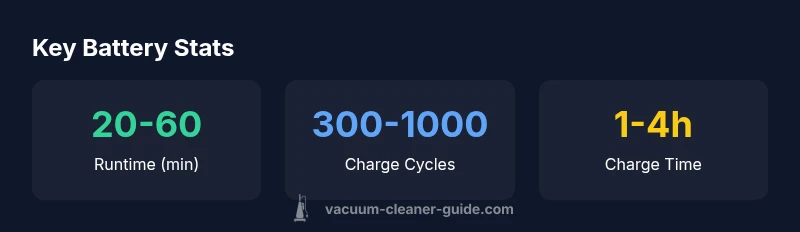
Battery lifespan is typically measured in charge-discharge cycles. A modern Li-ion pack in a vacuum cleaner often delivers several hundred to about a thousand cycles, depending on usage patterns and charging habits. Real-world life is influenced by how often you run at high power, storage conditions, and exposure to heat. Signs of aging include noticeably shorter runtimes, longer charging times, and occasional unexpected shutdowns. If the pack can no longer deliver a meaningful fraction of its original runtime, replacement often makes more sense financially than continued use of a weak battery. To extend life, store the device cool and dry, avoid deep discharges, and use the manufacturer’s charger. Always consult your model’s maintenance guide before replacing the pack.
OEM vs Aftermarket Batteries: Safety and Warranty
OEM (original equipment manufacturer) batteries are designed for a specific model and typically align with the manufacturer’s warranty. Aftermarket packs can save money but vary in quality, fit, and safety certifications. When selecting aftermarket options, choose batteries that specify the correct voltage, connector type, and built-in protection features (overcharge, overcurrent, short circuit). Read independent reviews focusing on longevity and performance, and ensure there is a fair return policy. Be mindful of potential warranty implications—some brands require OEM batteries for warranty coverage. In many cases, certified third-party batteries are acceptable, but always verify compatibility with your exact model number and serial. Purchase from trusted suppliers with clear testing standards and robust safety documentation.
Charging Best Practices to Maximize Life
Avoid leaving a battery on the charger after it reaches full capacity; many modern packs feature smart charging, but extended constant charging can still stress cells. Keep the vacuum and charger in a cool, dry area away from direct heat sources. If storing for extended periods, aim for a partial charge (around 40–60%) to minimize capacity loss. Use the original charger recommended by the manufacturer, and avoid low-quality docks that provide inconsistent current. Regularly inspect the battery for swelling, discoloration, or unusual warmth during charging, and discontinue use if you notice any signs of damage. Align charging routines with your cleaning schedule to optimize runtime and longevity.
Cost, Value, and Long-Term Savings
Battery replacement is often cheaper than buying a new vacuum, but the economics depend on model availability and pack pricing. Compare the replacement cost against the expected runtime gained and the price of a new unit with a ready-to-use battery. For frequent cleaners or pet households, a spare battery can dramatically boost productivity, but factor in charging time and storage space. Higher-quality Li-ion packs typically deliver more cycles and maintain peak performance longer than older chemistries. When evaluating value, consider total cost of ownership over several years, including potential warranty coverage. A thoughtful battery strategy can significantly extend a vacuum’s useful life and preserve resale value.
Practical Tips for Extending Battery Health
- Keep batteries away from heat sources and direct sunlight.
- Store at a partial charge (40–60%) in a cool, dry place.
- Use the official charger and a compatible dock.
- Avoid deep discharges; recharge when feasible.
- Periodically calibrate your battery if the health indicator changes.
- Consider a spare battery for longer chores or homes with pets.
Common battery types used in vacuum cleaners
| Battery Type | Typical Voltage | Typical Capacity | Lifespan (cycles) | Notes |
|---|---|---|---|---|
| Li-ion | 14.4–21.6V | 2000–5000mAh | 500–1000 | Common in modern cordless vacuums; high energy density |
| NiMH | 12–18V | 2000–5000mAh | 300–600 | Older tech; heavier; lower energy density |
| NiCd | 14.4V | 1000–2000mAh | 500–1000 | Memory effect risk; less common today |
FAQ
What is the best battery type for cordless vacuum cleaners?
For most cordless vacuums, Li-ion batteries provide the best balance of weight, runtime, and longevity. Look for compatible packs from the original manufacturer or certified third-party options that meet the required voltage and capacity.
Li-ion batteries are usually the best choice for cordless vacuums because of high energy density and light weight.
How long should a vacuum battery last?
Typical Li-ion packs offer hundreds to around a thousand charge cycles depending on use. Real-world life depends on heat exposure, charging habits, and how often you run the vacuum at high power.
Most vacuum batteries last several hundred cycles with proper care.
Can I replace a vacuum battery myself?
Yes, many models allow user replacement with the correct voltage, connector, and safety features. Always refer to the manufacturer’s manual and use a verified compatible battery.
You can often replace the battery yourself if you use the correct replacement and follow the manual.
Are aftermarket batteries safe?
Aftermarket packs can be safe if they meet the required specs and have proper safety protections. Choose reputable brands and ensure compatibility to avoid warranty issues.
Aftermarket batteries can be safe when they match the model and have protection features.
How can I extend battery life between charges?
Avoid full discharges, store in a cool place, and use the supplied charger. Keeping the pack at moderate charge levels and away from heat significantly extends life.
Store at partial charge and avoid heat to extend life.
When should I replace the battery vs the whole vacuum?
If runtime has dropped significantly and replacement parts are affordable, a battery swap can extend the unit’s life. If the cost of replacement exceeds a new model’s value, consider upgrading the vacuum.
If the battery is stuck and replacing it is reasonable, do that; otherwise consider a new vacuum.
“Battery technology has advanced rapidly in recent years, delivering longer runtimes and safer chemistries for domestic vacuums. Staying informed helps homeowners get the most value from their investment.”
The Essentials
- Verify compatibility before purchasing a replacement.
- Li-ion batteries offer the best runtime and weight savings.
- OEM packs generally safest for warranty and fit.
- Avoid deep discharges to maximize cycle life.
- Keep a spare battery for longer cleaning sessions.